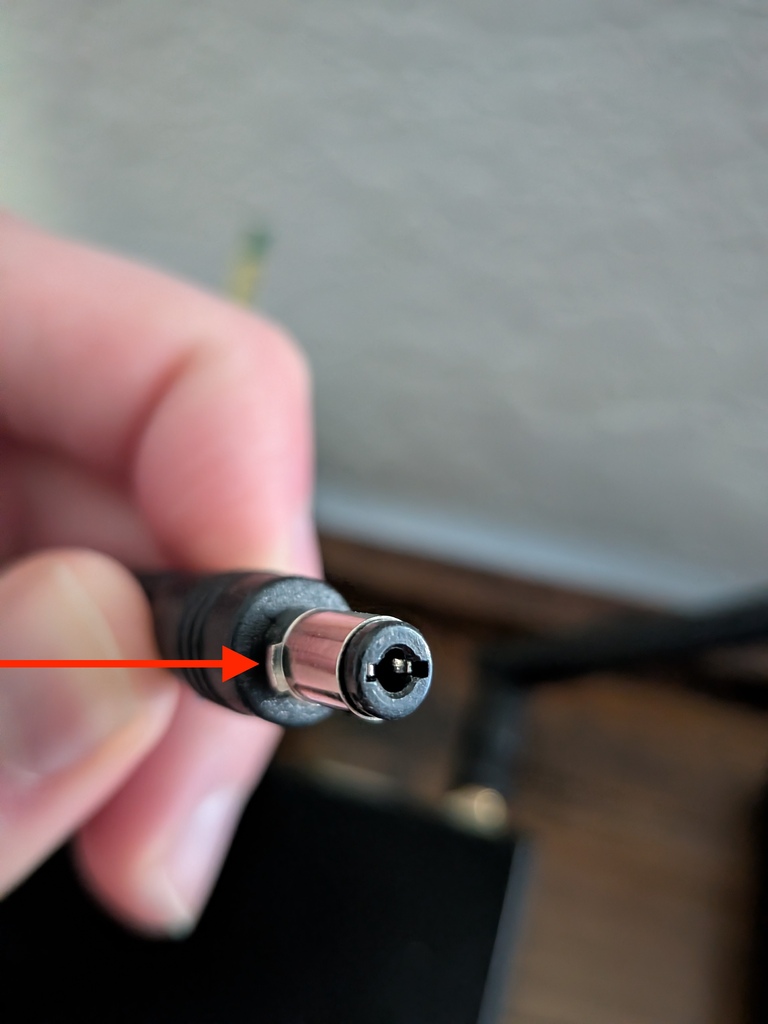
If your E300 device is not powering on after being plugged in, it is likely the power supply connector is not inserted all the way into the power port. The connector features keying tabs (small metal wings or fins) that must align with the matching notches inside the device’s connector port. If the connector is misaligned, it may feel inserted but is only partially plugged in, preventing power from reaching the device.
Step-by-Step Troubleshooting Guide
Check the Connector Alignment
Look closely at the barrel plug on your power supply cord.
Locate the small metal wings/fins on the side of the metal plug tip (indicated by the red arrow in the image above).
Orient the Plug Correctly
Horizontal Orientation (Correct): Rotate the plug so that the keying tabs are are pointing left and right (horizontal). This lines up the tabs with the notches inside the device port, allowing the plug to insert completely.
Vertical Orientation (Incorrect): If the tabs are pointed up and down (vertical), the plug will get blocked and only go halfway in, leaving the connection incomplete.
Fully Insert the Plug
Press the connector firmly into the port until it fits flush.
Verify that the device powers on.